Introducing Publish It Yourself: a self-managed libre CMS
Publish It Yourself is a self-managed CMS. It is designed to create autonomous communities where users can directly create and manage content.
It is a mix between blogs and blogs platforms, digg-likes and open publishing websites such as the Indymedia network.
It allows to publish and promote rich text articles and news. It includes many features: tagging with triple tags support, comments, spam protection, themes, interface translation, registration system, peronnal users pages, Atom feeds, microformats, and more! Every pages are optimized for search engines, including expressives URLs and uniques titles.
It is written in PHP using the symfony framework. It is modular and object oriented. The Javascript part of the code uses jQuery, the built-in theme is (x)HTML 5 compliant.
This software is still in an early stage of development and probably has many bugs, please report them! It is a free software covered by the GNU Affero General Public License version 3.
You can try it online (database cleared periodically) or download it on GitHub. Contributions are welcome (see the TODO file inside the project root directory) and can be submitted directly on GitHub.
Elf Hostel où le référencement viral efficace
Cet été je me suis dans une auberge de jeunesse de Prague dénommée Elf Hostel dont la stratégie marketing est assez remarquable.
L’hôtel dispose d’un site au design d’un autre âge mais disponible dans de nombreuses langues. Sur ce site il est possible de réserver chambres et lits en ligne et de consulter quelques chaleureux reportages photos et vidéos. On y retrouve également les informations détaillées d’accès au lieu. Bref du très classique pour un hôtel, sans fioritures, juste ce qu’il faut.
Le réferencement naturel du site semble avoir était un peu travaillé (balises meta, titres des pages, …), sans grand succès apparent.

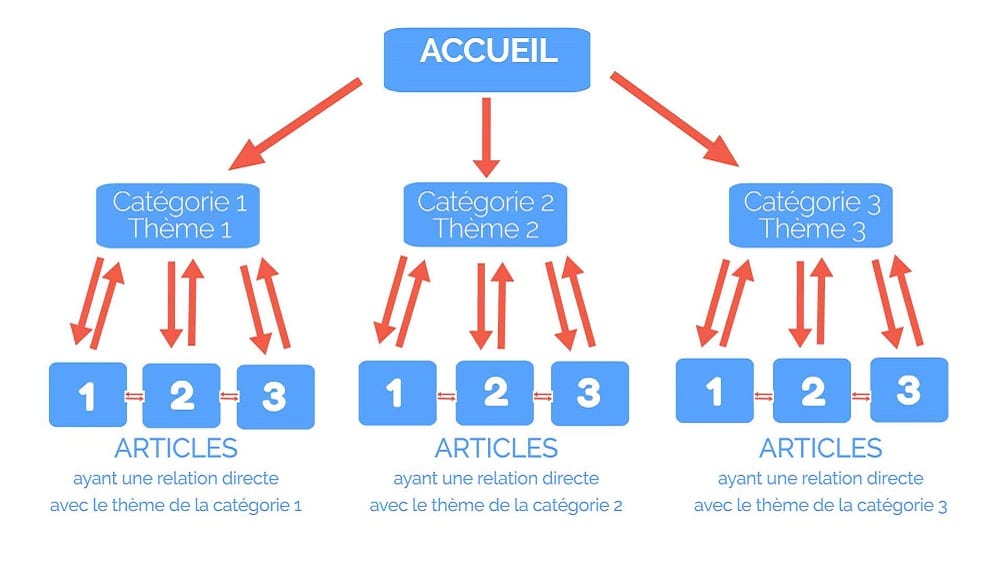
La ou leur démarche devient intéressante, c’est que l’équipe de l’hôtel a mis en place une page Facebook régulièrement mise à jour. A la fin de leur séjour, les clients sont invités à en devenir fan. L’appât : 5% de réduction lors des séjours suivants !
Grâce à ce petit stratagème environ 700 personnes sont « fans » de l’hôtel sur Facebook et les éléments publiés dans le mini-feed sont repris sur de nombreux profils via les commentaires et la fonction « j’aime ça ». Le marketing viral tourne à plein régime, les amis des anciens clients entendent parler en bien de l’hôtel, en découvrent l’ambiance rock’n'roll par ce biais et réservent plutôt la qu’ailleurs.
Encore mieux, ils encouragent les gens à écrire des revues sur les sites dédiés à ça, et la c’est plus de 200 avis qui ont étés rédigés. Les avis des consommateurs comptant pour une part importante dans le classement des résultats sur Google Maps, l’hôtel grimpe en seconde position sur ce dernier… Ces résultats géolocalisés sont repris sous forme de widget en tête de l’index principal de Google. Voilà notre hôtel deuxième sur Google.com avec la requete « Hostel Prague » !
Grâce à cette stratégie, sommes toutes simple à mettre en place, l’hôtel, profite d’une visibilité énorme. Même si la bière de 50cl vendue moins de 1€ et l’ambiance sympa doivent également y être pour quelque chose, il est bondé, et l’écrasante majorité des réservations proviennent du net.
Tag Suggestion for symfony
I just have created a patch for sfFormExtraPlugin. It provides a new form widget called sfWidgetFormJqueryTagSuggestion designed to suggest tags. It is based on the Tag Suggestion jQuery plugin of Remy Sharp.

You can download it from GitHub, just copy the files to the corresponding directories of your existing sfFormExtraPlugin installation or wait for upstream inclusion of my patch.
This widget integrates easily with sfPropelActAsTaggableBehaviorPlugin. Here is how to use it with this plugin.
You must have sfFormExtraPlugin with my patch and sfPropelActAsTaggableBehaviorPlugin properly installed and working. We consider that you have a model called Article with the taggable behavior.
Add jQuery to your javascripts
Like many others sfFormExtraPlugin widgets, the sfWidgetFormJqueryTagSuggestion requires jQuery to work. If you already have it installed, you can skip this step. Either, download jQuery to the web/js/ directory of your project, open the config/view.yml file of your application and set it like that:
default:
javascripts: [jquery-1.3.2.min.js]
Of course, change the filename if needed.
Put Javascripts and CSS into your web directory
sfFormExtraPlugin need some CSS and Javascripts to work properly, run the symfony plugin:publish-assets command to put them into corrects directories.
Create a static function to retrieve matching tags
Its time to extend the TagPeer model class to add it a method allowing to retrieve tags corresponding to a query. Creates a new file called MyTagPeer.class.php into the lib/model/ directory of your project containing the following code:
class MyTagPeer extends TagPeer {
/**
* Gets tags for a selector
*
* @param string $q
* @param int $limit
* @return array
*/
static public function retrieveForSelect($q, $limit = 10)
{
$criteria = new Criteria();
$criteria->add(TagPeer::NAME, '%'.$q.'%', Criteria::LIKE);
$criteria->addAscendingOrderByColumn(TagPeer::NAME);
$criteria->setLimit($limit);
$tags = array();
foreach (TagPeer::doSelect($criteria) as $tag) {
$tags[] = $tag->getName();
}
return $tags;
}
}
Do not forget to run symfony cc to clear the cache after that.
Create a controller method to send the result as JSON
We have the model, we need the controller. Create a new module called tag by running symfony generate:module yourapp tag and add the following method to the tagActions class:
/**
* Displays a JSON encoded tags array
*
* @param sfWebRequest $request
* @return string
*/
public function executeSelect(sfWebRequest $request)
{
$this->getResponse()->setContentType('application/json');
$tags = MyTagPeer::retrieveForSelect($request->getParameter('tag'));
return $this->renderText(json_encode($tags));
}
Open your routing.yml file and add the following line to be able to access this action:
tag_select:
url: /select-tag
param: { module: tag, action: select }
Modify your form to add the new tags suggestion widget
Open the form class you want to add this widget and add the following line to the end of the configure method:
$this->widgetSchema['tags'] = new sfWidgetFormJqueryTagSuggestion(array('url' => $this->getOption('url'), 'separator' => ', '));
We use the comma as separator instead of the space by default because this is the separator used by sfPropelActAsTaggableBehaviorPlugin.
Next, modify your call to the form in your actions to pass the AJAX URL as form option:
$this->form = new ArticleForm($article,
array('url' => $this->generateUrl('article_select_tag'))
);
It’s done!
Changer l’emplacement de mysql.sock avec MAMP
Si comme moi vous utilisez le serveur MySQL fourni avec MAMP pour d’autres usages que le développement PHP, par exemple comme gestionnaire de base de données pendant la création d’applications Django ou Ruby on Rails, il peut être utile de changer l’emplacement de son socket UNIX vers un emplacement plus commun, qui sera trouvé automatiquement par ces applications. Par exemple /tmp/mysql.sock.

Pour ce faire il va nous falloir modifier les script de lancement et d’arrêt de MySQL. Rendons nous dans le dossier bin de MAMP :
cd /Applications/MAMP/bin
Et sauvegardons les scripts dans leur version actuelle :
cp startMysql.sh startMysql.old.sh
cp stopMysql.sg stopMysql.old.sh
Éditons maintenant ces deux fichiers avec notre éditeur de texte préféré (pour ma part ça donnera vim startMysql.sh stopMysql.sh) et remplaçons les occurrences de /Applications/MAMP/tmp/mysql/mysql.sock par /tmp/mysql.sock. Sauvegardez ces deux fichiers puis relancez MAMP.
Vos applications extérieures à MAMP seront désormais à même de se connecter au serveur MySQL via socket UNIX sans configuration particulière… en revanche impossible de se connecter au serveur via PHP. Effectivement, il nous faut également mettre à jour la configuration de PHP.
Éditons le fichier /Applications/MAMP/conf/php5/php.ini (ou /Applications/MAMP/conf/php4/php.ini si vous utilisez encore PHP 4) et remplaçons la ligne mysql.default_socket = /Applications/MAMP/tmp/mysql/mysql.sock par mysql.default_socket = /tmp/mysql.sock.
Redémarrez à nouveau MAMP et tout devrait fonctionner correctement !
Twisted Python Twitter library with OAuth support
I have just pushed OAuth support in my Twitty Twister branch on GitHub. This library created by dustin allows to access the Twitter API using Twisted for Python: a high performance networking engine. It is to my knowledge the first Twitter library written in Python that supports authentication via OAuth. My version of Twitty Twister is backward compatible, allows to choose between standard or OAuth authentication and even allows to change the user’s avatar via OAuth.
![]()
The library does not currently support tokens exchanges (the login flow). So, to use this library and the associated examples you need to register your application on Twitter and get users access tokens using something like Django Twitter Auth for Django.
The 4 first parameters of the examples commands (files ending with -oauth.py in the example/ directory) are always the application’s key, the application’s secret, the user’s key and the user’s secret. See the OAuth Twitter FAQ for futher information.
Have fun!
Votez pour Joad et Alex au concours de boîtes Kub Or
Nos potes designers Joad et Alex se sont lancés dans la de création de boîtes Kub Or. Un concours organisé par la société permettra au gagnant de voir apparaître son graphisme sur 220 000 boîtes collector en 2009 et de remporter 10 000€.
Voici la création de Joad :

Votez pour eux
Code’N'Roll: my new Rock’N'Roll microblog
Retrouvez l’un de mes articles dans Linux Identity n°6
Les anciens utilisateurs de Easy Ubuntu trouveront sûrement un intérêt à l’article intitulé Installation des pilotes et des extensions nécessaires à une utilisation courante
publié dans Linux Starter Kit / Linux Identity n°6. Dedans, j’y détail l’installation des composants soumis à des brevets logiciels et / ou non-libres qui ne sont pas distribués avec Ubuntu mais qui se révèlent malheureusement indispensable pour une utilisation multimédia de son ordinateur (lecture de musiques et de vidéos, de DVD, jeux vidéos en 3D, …). L’article revient en partie sur les fonctionnalités du petit utilitaire que j’avais conçu aux débuts d’Ubuntu et indique comment arriver au mêmes résultats en utilisant les mécanismes qui ont étaient intégrés dans la distribution depuis.

Le magazine est fourni avec un CD d’installation francisé d’Ubuntu Intrepid Ibex et contient bon nombre d’autres articles qui compléteront agréablement la documentation francophone pour vous aider à prendre en main la distribution. Il est disponible en kiosques et depuis le site internet d’Oxy Press pour une dizaine d’euros.
Je ne reviendrais pas sur le choix du Tux Napoléon en couverture
Patch to use sfXssSafePlugin with symfony 1.2
HTML Purifier is a awesome PHP filter library designed to secure and add standard compliance to HTML. In websites including user generated content, this library allow to have mutlimedia pages including image, text formating and YouTube videos in a secure and SEO proof way thanks to rich text editors like Tiny MCE or FCK Editor and HTML purifier.

A plugin called sfXssSafePlugin is designed to integrate this library as an escapement strategy in symfony. If you have tried it with symfony 1.2 you can see this message:
HTML Purifier autoloader registrar is not compatible
with non-static object methods due to PHP Bug #44144;
Please do not use HTMLPurifier.autoload.php (or any
file that includes this file); instead, place the code:
spl_autoload_register(array(’HTMLPurifier_Bootstrap’, ‘autoload’))
after your own autoloaders.
There are also some strict standards and constants compatibility problems. I’ve just wrote a patch to get this plugin working with symfony 1.2.
- Install sfXssSafePlugin like described in its README file
- Download my patch in the plugin’s folder
- Go into the plugin’s folder and run patch lib/helper/XssSafeHelper.php < XssSafeHelper.php.patch
- Edit your application configuration file (ie: apps/frontend/config/frontendConfiguration.class.php) and add the following code into the
configure()method:require_once(sfConfig::get('sf_plugins_dir').'/sfXssSafePlugin/lib/vendor/htmlpurifier/HTMLPurifier/Bootstrap.php'); spl_autoload_register(array('HTMLPurifier_Bootstrap', 'autoload'));
It’s done ! I’ve submitted this patch to the plugin’s author. I hope it will be upstream soon
Feedburner: Switching to Google account with MyBrand enabled
Since I’ve migrated my FeedBurner account to Google I encounter a lot of problems, especially with the MyBrand service. MyBrand is a service allowing to use custom domain names with FeedBurner. Instead of something like http://feeds.feedburner.com/lapin-blanc, your feed address become http://feeds.lapin-blanc.net/lapin-blanc. I’ve already explained why it’s better !
![]()
My subdomain for feeds was rss.lapin-blanc.net. There is no way to get this subdomain working since I’ve switched to Google accounts. I’ve followed the Tim Heuer’s tutorial but the message The domain « rss.lapin-blanc.net » you specified is already in use.
is still displayed when I try to recreate my main custom URL in the MyBrand settings page. I’ve just managed to get my « backup » domain called feeds.lapin-blanc.net working.
So I’ve created this quick-and-dirty hack:
- Set a working MyBrand domain. For me:
feeds.lapin-blanc.net. - Point the DNS entry of your primary feeds domain on your web server. For me me: replace
rss 10800 IN CNAME <my-login>.feedproxy.ghs.google.com.byrss 10800 IN CNAME www. - Create a virtual host on your web server to redirect permanently the old addresses to the new one. For me (using Debian GNU/Linux):
Create a file called/etc/apache2/sites-available/rss.lapin-blanc.netcontaining:<VirtualHost *> ServerName rss.lapin-blanc.net RewriteEngine On RewriteRule ^(.*) http://feeds.lapin-blanc.net$1 [L,R=301] </VirtualHost>Next type in a shell
a2ensite rss.lapin-blanc.net && /etc/init.d/apache2 reload. - Change all occurrences of your old feeds URL to the new in your site to reduce the number of HTTP requests.
Your burned feed must work without losing readers. This a temporary solution, and I think that the only useful long term solution is to go away from FeedBurner…